
The 90-Day Plan to Get Your Store's CRD Current Before January 15 (Without Changing Your Mail Software)
October 15 Just Passed. January 15 Is 92 Days Away.
If you signed the October certification with a knot in your stomach, or did not sign it at all, you are not unusual. The USPS Customer Registration Database launched on October 25, 2023, and a store that has rented boxes for fifteen years walked into it with fifteen years of paper. When the USPS Office of Inspector General audited the program in June 2025, it reported missing or outdated applications and inaccurate data across a system of nearly 12,000 CMRAs. A backlog is the normal starting point, not a special failure.
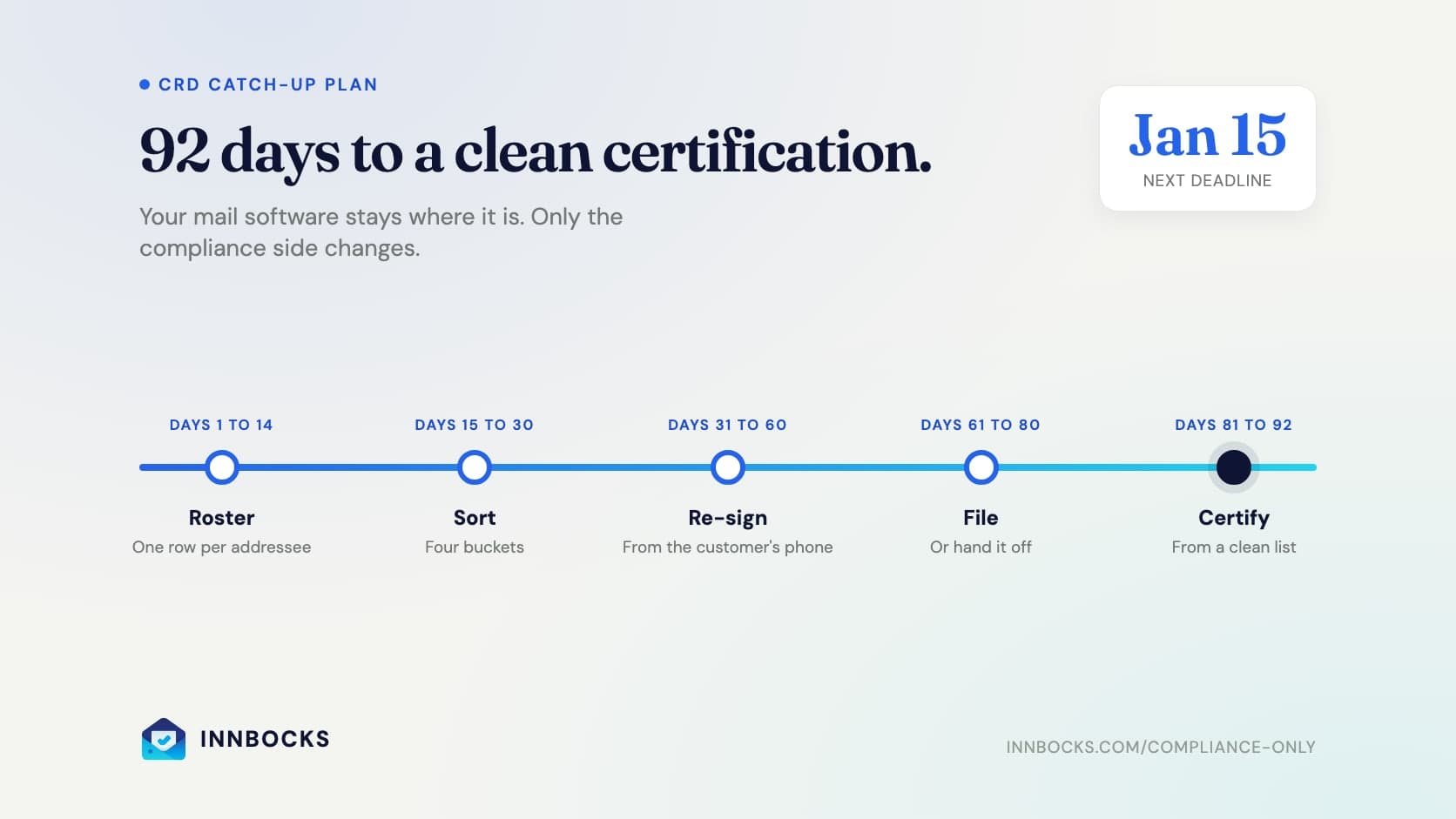
The next certification is due January 15. This is a plan to get there with a clean list, built for the store that is not going to change its mail software to do it. Whether you run PostalMate, ShipRite, a network's app, or a spreadsheet, the mail side stays where it is. The plan only touches the compliance side.
Each phase has a date range, a deliverable, and the trap that usually eats the time.
Before Day 1: Make Sure You Can Actually File
The plan fails on day 61 if nobody can log in. Confirm three things now.
- Your Form 1583-A is on file and current. It was filed with the postmaster for your delivery address, and refiled when the business details changed.
- You have Business Customer Gateway access with the CRD service for your location. Registration is what unlocks it. If you have never found the upload screen, read How to Get USPS CRD Access first. The steps are not obvious, and they take days, not minutes.
- One named person owns the clicking. Entries are made by a person in the Gateway. Decide now whether that person is on your staff or whether you will hand the uploads to a service, because it changes how much of days 61 to 80 you need to protect.
Deliverable: a working Gateway login that reaches the CRD, and a name next to "who files."
Days 1 to 14: Build the Roster From What You Already Have
You are not starting from zero. Your POS or your network's portal already holds every active box. Export it, then reshape it into the list USPS actually cares about.
- One row per addressee, not per box. A business box with three named people is three records, each with its own Form 1583 and two IDs. This is the single most common reason a store's roster is shorter than its CRD obligation.
- PMB number on every row. The CRD record and the mail both hang off it.
- Email and mobile number. You will need them on day 31.
- Status. Active, or closed with the closing date if you know it.
PostalMate and ShipRite both export customer lists, and the mailbox report is usually closer to what you need than the customer report. Network portals export their own customers, and those rows go on the same list, because the certification covers everyone at your address.
Deliverable: a spreadsheet with one row per addressee, imported into whatever system of record you will use for the next 78 days.
Trap: treating the network's customers as handled. Their records live under your CRID like everyone else's. If your store is a franchise with a corporate digital-mail partner, this is the whole problem.
Days 15 to 30: Sort Every Record Into Four Buckets
Now compare the roster against two things: the Form 1583 you actually hold, and what is already in the CRD.
| Bucket | What it means | What happens next |
|---|---|---|
| 1. Current and in the CRD | Form on file, both IDs unexpired, record entered | Nothing, until something changes |
| 2. Current, not in the CRD | Form and IDs are fine; nobody ever uploaded them | File it (days 61 to 80) |
| 3. Expired, stale, or missing | An ID has expired, the address or authorized people changed, or there is no form at all | Re-sign and re-collect (days 31 to 60), then file |
| 4. Closed, not recorded | The box was terminated and the CRD does not show a date | Record the termination date (days 61 to 80) |
What makes a record stale is specific. There is no rule that a Form 1583 expires on a schedule. A form from 2019 is current if every fact on it is still true and both IDs are unexpired. It goes stale when an ID expires, when the home address changes, when the authorized recipients change, or when a name changes. That is why "re-sign everyone every year" is not required and "never look at it again" is not allowed. The compliance myths article covers the other rules operators invent.
Count the buckets. The size of bucket three sets the pace for the next 30 days.
Deliverable: every row tagged with one of the four buckets.
Trap: finding the IDs. Many stores kept the signed form and never kept a legible copy of both IDs, or kept copies on a machine that printed black squares. An illegible ID in the CRD counts the same as a missing one, so a form with no usable ID copy belongs in bucket three.
Days 31 to 60: Re-Sign and Re-Collect
This is the phase that takes real calendar time, because it depends on customers. Start it early and run it in waves.
- Send every bucket-three customer a link, not a PDF. A pre-filled Form 1583 they complete on their phone, with ID photos captured in the same flow, gets finished. A PDF attachment gets printed and lost.
- Offer all three execution paths USPS allows. Signing in your physical presence at the counter, signing in your live video presence, or acknowledgment before a notary, including a remote online notary. For the customer who is never in the store, online notarization is the path that closes.
- Check the IDs against the actual lists. One photo ID from the Box 8 list, one address ID from the Box 9 list, both current, and a driver's license counts for only one of them. The exact IDs USPS accepts are shorter than most customers expect.
- Business boxes: one form per named person. Every individual who receives mail at the box signs their own form with their own two IDs.
- Set a date and say what happens after it. A customer who will not complete a form by a stated date is a customer you cannot keep receiving mail for. Decide the policy before the first reminder goes out, record the termination date for anyone who does not respond, and move them to bucket four.
Run the waves a third of the bucket at a time through weeks five, six, and seven, and keep week eight for stragglers and re-dos.
Deliverable: bucket three emptied into bucket two (ready to file) or bucket four (terminated).
Trap: chasing by hand. Reminders by email and text, sent on a schedule, do the chasing. Your counter staff should only be answering questions.
Days 61 to 80: File, or Hand It Off
Every record in bucket two now goes into the CRD, one entry per addressee with both ID images, and every record in bucket four gets its termination date. Two rules govern this phase.
- USPS has no API for the CRD. No software submits entries on its own. Entries are made by a person in the Business Customer Gateway, so budget real time per record and spread it across the twenty days instead of planning one heroic weekend.
- Keep evidence for every entry. A confirmation number, a screenshot, or a dated attestation per upload and per termination. This is what you show an inspector, and it is what lets you sign on January 15 without re-checking everything.
You have two ways to do the clicking. Do it yourself, working from a ledger that lists exactly what each entry needs, with a browser extension that fills the Gateway fields from the record so the work is checking rather than keying. Or hand the uploads and the terminations to a managed service that enters them under your CRID and records the evidence for you. Either way, the obligation stays yours. Only the labor moves.
Deliverable: buckets two and four empty. Every active addressee in the CRD with legible IDs, and every closed box with a date.
Trap: terminations. Stores file the new customers and forget the old ones, and the certification asks about both. What USPS requires when a customer leaves is more than most operators expect.
Days 81 to 92: Certify From a Clean List
With the backlog filed, the certification becomes what it was always supposed to be: a review. Before January 15:
- Pull the roster one more time and confirm every active addressee is in bucket one.
- Check which IDs on file expire during the coming quarter and start those renewals now, so April does not open with a new bucket three.
- Confirm every termination from the quarter has a date in the CRD.
- Sign, and keep the confirmation with the rest of the evidence.
The attestation covers three claims: every Form 1583 on file is current, every termination date is recorded, and no ID on file has expired. If you can show all three from your own records, you are done. The quarterly certification guide covers what the signature legally means.
Deliverable: a signed certification and an evidence folder that explains it.
After January 15: Do Not Build the Backlog Again
The backlog came from treating the CRD as a deadline instead of a habit. From here, four events create CRD work, and each one should open a task the day it happens: a new approval, a replaced ID, a change to a customer's address or authorized people, and a termination. Handle them weekly and April 15 is a formality. Do You CRD? is the operating rhythm.
Running the Plan Without Changing Your Mail Software
Every step above can be done with a spreadsheet, a scanner, and discipline. Most stores that try it stall in days 31 to 60, where the work depends on customers, or in days 61 to 80, where the work depends on one person's evenings.
A compliance-only account on Innbocks is this plan as a product, running beside whatever handles your mail:
- Days 1 to 30. Import the roster with PMB numbers, and every addressee gets a status that shows which bucket they are in.
- Days 31 to 60. Customers get the link, the form is pre-filled from their ID, and they sign at the counter, by video, or with an integrated online notary. Reminders go out automatically. Expiration dates are read from the IDs.
- Days 61 to 80. The Prepare for CRD ledger lists what each entry needs. You file with the browser extension, or the Managed CRD Service files for you, backlog included, with evidence recorded per entry.
- Days 81 to 92. The certification roster is assembled with open tasks and expired IDs listed before you sign.
Your mail, your boxes, and your customer billing stay in PostalMate, ShipRite, or the app your network gave you. Your customers see Innbocks only for their compliance steps.
Start with a compliance-only account, or score your readiness first to see how big bucket three is.
Sources
- Domestic Mail Manual 508.1.8, Commercial Mail Receiving Agencies (USPS)
- Domestic Mail Manual 608.10.0, Acceptable Forms of Identification (USPS)
- Postal Bulletin 22624, DMM Revision: Commercial Mail Receiving Agencies (USPS)
- Federal Register, Commercial Mail Receiving Agencies, final rule (May 19, 2023)
- Management of Commercial Mail Receiving Agencies, Report 24-146-R25 (USPS Office of Inspector General, June 24, 2025)
- USPS Business Customer Gateway
Related reading
- Your Franchise Picked Your Digital Mailbox Vendor. It Did Not Pick Your CRD.
- Do You CRD?
- How to Get USPS CRD Access
- The USPS Customer Registration Database: what must be uploaded for every customer
- USPS Compliance Center, our operator reference covering Form 1583 execution, ID requirements, CRD duties, quarterly certification, PMB addressing, and termination rules
Written for CMRA operators searching for: "CRD backlog," "catch up CRD records," "CMRA quarterly certification January 15," "how to get CRD current," "CMRA deficiency notice what to do," and "Form 1583 re-sign expired ID."
Innbocks provides software that supports USPS CMRA compliance workflows, including Form 1583 collection, e-notarization, and CRD task tracking. Innbocks is not affiliated with the U.S. Postal Service and does not provide legal advice. The operator of each CMRA remains responsible for satisfying USPS requirements, including those in Domestic Mail Manual 508.1.8. Always verify current rules against official USPS sources.
This article is part of our USPS Compliance Center.