Mobile app for your mailroom team
The Innbocks app for iOS and Android puts intake and scanning in your staff's hands. Photograph mail to log it, scan documents with the phone camera instead of a flatbed scanner, and work the request queue from anywhere in the store. Your customers need nothing to install: their portal runs on your domain in any browser.
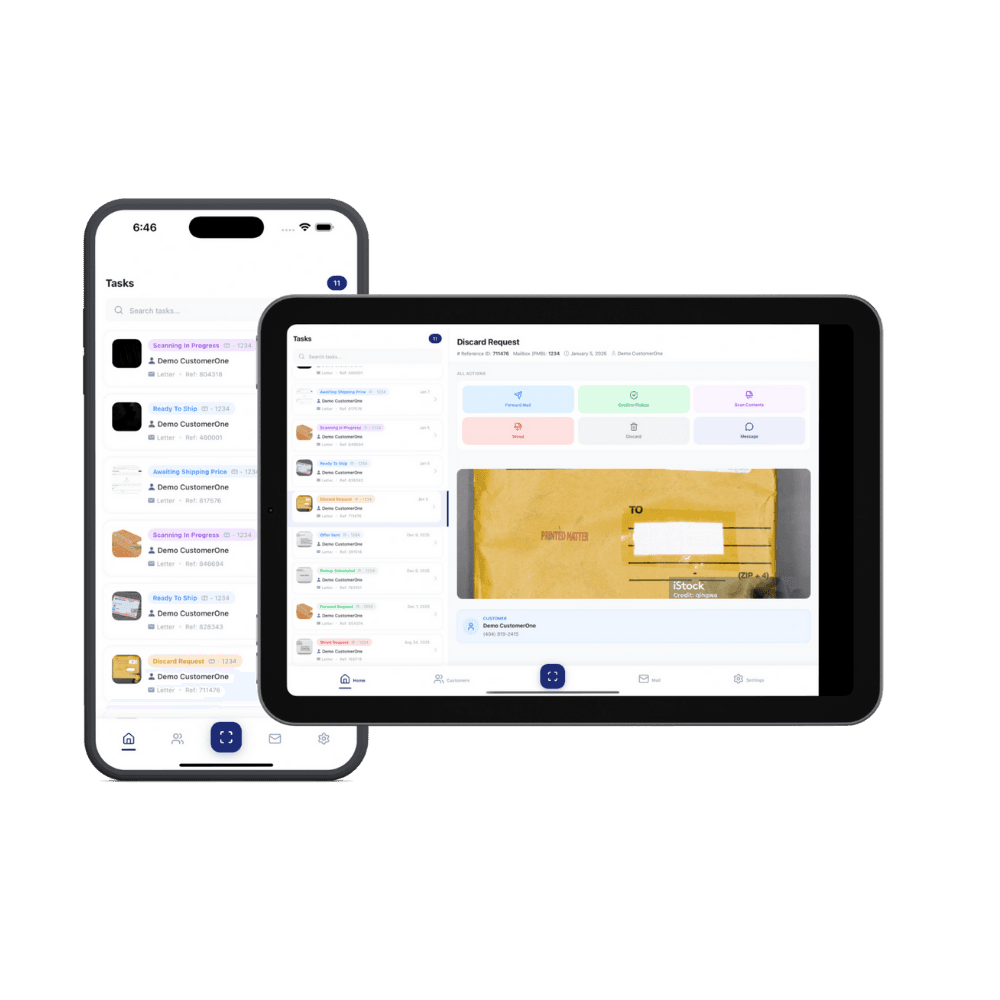
What your team does in the app
Staff sign in to your store's account on their own phones. Intake, scanning, and fulfillment happen wherever they are standing, not only at the desk with the scanner.
Log mail with the phone camera
At the counter or in the back room, staff photograph an envelope or package and Innbocks matches it to the right customer in a few taps. The customer is notified from your store.
Scan documents without a scanner
Open-and-scan requests are fulfilled with the phone camera, so the scanner is wherever your staff are. No flatbed, no kiosk, no extra equipment.
Work the request queue
Scan, forwarding, pickup, storage, and shred requests land in one queue. Complete a request and the customer is updated from your store.
Staff accounts and roles
Team members sign in with their own accounts and see only what their role allows, and every mail-handling step is recorded in a tamper-evident chain of custody log.
What your customers use
Customers do not download an app. Their portal lives on your domain and works in any phone, tablet, or desktop browser, under your brand.
Mail notifications
Customers get an email or text from your store the moment your team logs a new piece of mail or a package.
Envelope images and scans
Envelope images and requested document scans are in the portal, so "did I get anything?" never needs a phone call.
Requests from any browser
Open and scan, forward, hold for pickup, store, or shred: customers choose what happens to each item from their phone or computer, and your team sees the request in its queue.
Form 1583 and account management
Customers complete their USPS Form 1583 onboarding, update payment details, and manage their subscription from the same portal, under your brand.
Built with security in mind
Connections are encrypted, mail images live in access-controlled cloud storage behind expiring signed links, and card payments are processed by Stripe, so full card numbers never touch our servers. Every mail-handling step is recorded in a tamper-evident chain of custody log. Read more on our security page.
Mobile app FAQ
What mobile apps are available?
The Innbocks app for iOS and Android is for you and your staff. It puts intake and scanning in your team's hands: photograph an envelope or package to log it, scan documents with the phone camera instead of a flatbed scanner, and work the request queue from anywhere in the store. Your customers do not need an app. Their portal runs on your domain in any phone or computer browser.
What can my team do from a phone or tablet?
Your team runs the operator dashboard from any phone, tablet, or computer browser, and the Innbocks app for iOS and Android adds the camera: photograph and log new mail and packages in a few taps, scan documents without a flatbed scanner, assign items to the right customer, and work the request queue for scans, forwarding, pickup, storage, and shredding. Staff sign in with their own accounts and see only what their role allows.
What can my mailbox customers do from their phone?
From their portal on your domain, which works in any phone or computer browser with nothing to install, your customers get a notification when mail arrives, view envelope images and scans, and request actions: open and scan, forward, hold for pickup, store, or shred. They can also complete their USPS Form 1583, update payment details, view invoices, and manage their subscription, all under your brand.
How is customer data secured?
Innbocks is built with security in mind. Connections are encrypted, mail images live in access-controlled cloud storage, and card payments are processed by Stripe, so full card numbers never touch our servers. Mail is logged from the outside of the envelope, and contents are only opened or scanned when your customer requests it and your procedures allow it. Every mail-handling step is recorded in a tamper-evident chain of custody log. And because Innbocks is private-label software, your customer data belongs to your business, not to a marketplace.